Does Bright SDK comply with Apple's third-party SDK requirements?
Yes Bright SDK is fully compliant with the policy, as published here.Bright sdk contains privacy manifest and has code signing by Bright Data’s account. This has been implemented in SDK version 1.454.734.
How does Bright SDK impact my App store privacy settings?
BrightSDK does not collect any personal information, except for the user’s IP address. BrightSDK knows that a certain IP exists but not who owns it, or any other information. In addition, BrightSDK monitors and collects depersonalized performance metrics, network usage by SDK to analyze and improve performance.You can see actual information of privacy usage by SDK (Apple related) in the privacy manifest file located in the SDK framework bundle.It is quite likely that your current privacy settings already cover what Bright Data collects (for example: if you have ads in your app). If not, please adjust your privacy settings to be at a minimum as follows:settings.jpg
Does Bright SDK run in the background on iOS/tvOS devices?
No, Bright SDK only runs when the application is visible on screen. App Store guidelines do not allow background processes and Bright SDK carefully follows iOS developer guidelines. See here.
Does Bright SDK collect any personal information? Is it impacted by Apple's “App Tracking Transparency” (ATT)?
No personal information is collected, except the user’s IP address. Bright Data does not know anything about the user and does not do any tracking. Specifically, to be clear, BrightData does not leave cookies on the phone, DOES NOT record, store or send the user’s IDFA. We just know that, for example, an iPhone 12 with IP of 94.23.64.123 exists – nothing more.Because the Bright SDK does not track the user in any way, it is of course not impacted by App Tracking Transparency. There is no need to ask for ATT permissions.In fact, Bright SDK is probably the most privacy-aware monetization solution on the market.
May I offer Premium/subscription to my users in exchange for opting in?
No. DO NOT suggest BrightSDK as an alternative to paying for subscription via the AppStore.
This is in violation of AppStore’s policy.
My game is developed in Unity. Does Bright offer an SDK for Unity?
I have many apps on iOS. Which ones will generate the highest revenue for me?
First, you are welcome to implement the Bright SDK in all of your apps. In terms of highest revenue potential, we suggest implementing the SDK on apps that have highest DAU. Adding to that, and since iOS SDK cannot work in the background (due to OS restrictions), we would also start with apps with the longest session length.
Is Bright SDK a "Third Party Proxy"?
No.No third parties are allowed to use Bright SDK for iOS. Only Bright Data creates each requests that goes through Bright SDK to specific websites., Technically Bright SDK only accepts requests from authenticated Bright Data servers. This gives Bright Data full control so we know what websites are indexed at all times.A closed list of websites is indexed in order to keep Bright Data’s large datasets up to date. You can see the type of data collected and the websites the information is collected from in the datasets page.
Does Bright SDK work if parental controls are enabled?
Starting from Version 1.385.451, Bright SDK checks if parental controls are set on the iOS device. If parental controls are enabled, the Bright SDK consent screen will NOT be displayed to the user, which of course means Bright SDK will not be active on the device.This is by design, in order to ensure informed consent. Contact your Bright SDK team if you have any additional questions.If you did not update your Bright SDK to version 1.385.451 or newer, please do so ASAP as support for previous versions will be discontinued in the near future.
Do I need to remove any existing SDKs I already implemented?
No. BrightSDK can work side by side with other SDKs (e.g. AdMob, IronSource etc.).
Can I use iOS SDK to replace ads in my app?
Usually, developers use the Bright SDK in conjunction with ads, but if you prefer to have an ad-free app, you can use Bright SDK on its own.
Can I use iOS SDK in addition to my existing ads? What is the “donation” model?
Absolutely. In the “donation model” use case, you are effectively asking your user to support you (for example: “Help keep my app free. If you accept the offer on the next screen, I will be paid”). Users may decide to opt-in if they love your app and want to support you, and if they do you will enjoy additional revenue on top of your current earnings from ads.
Does Bright SDK support react native integration for iOS?
Yes, just like any other native module integration.See this article for more information.
My dashboard shows 0 active devices even though users opted in. Why?
The app needs to pass the self-check and Bright Data review before devices start counting. Also check that the app status is set to “Active/Approved” in the dashboard.
How to obtain BrightSDK API Key?
The BrightSDK tools authenticate with the releases API using an API key. Follow these steps to create one.
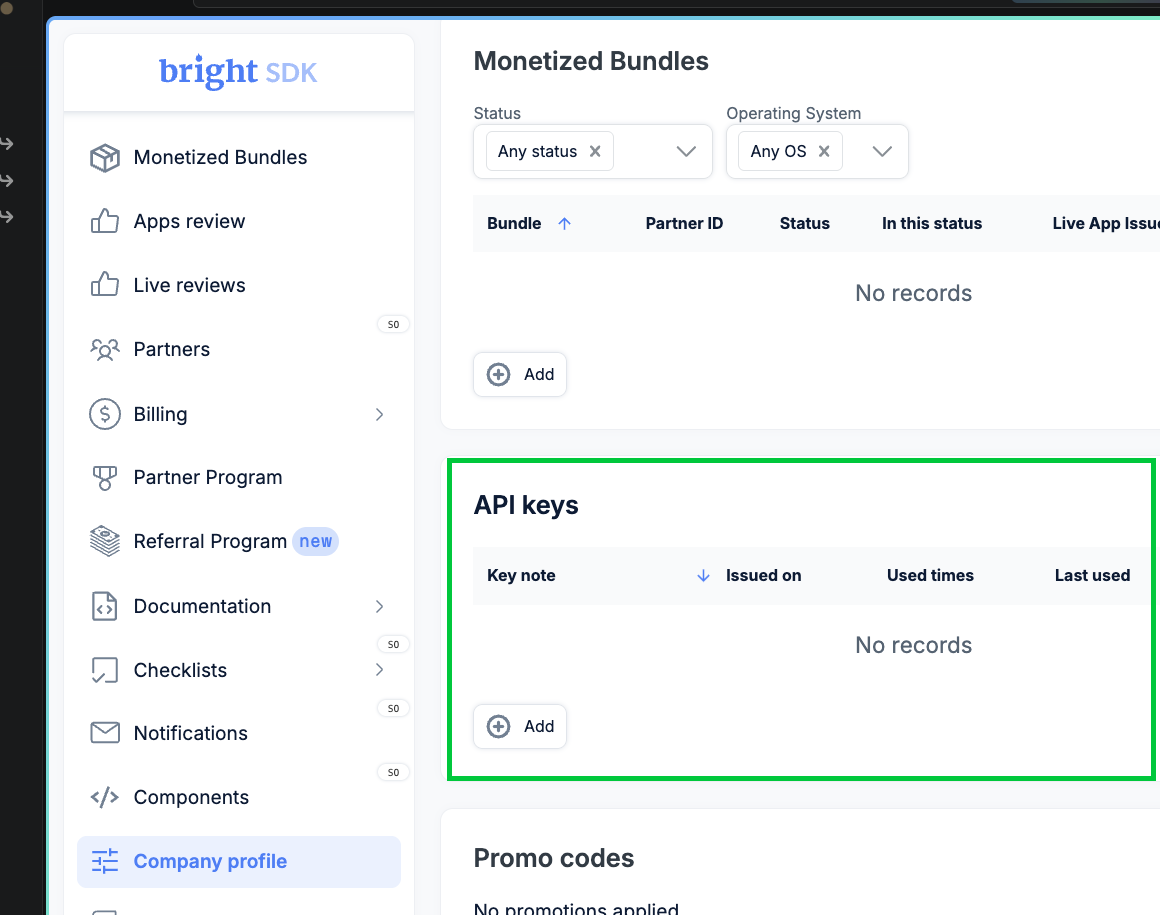
Open API Keys
Log in to the BrightSDK Control Panel - this links directly to the API keys section.
Create a new key
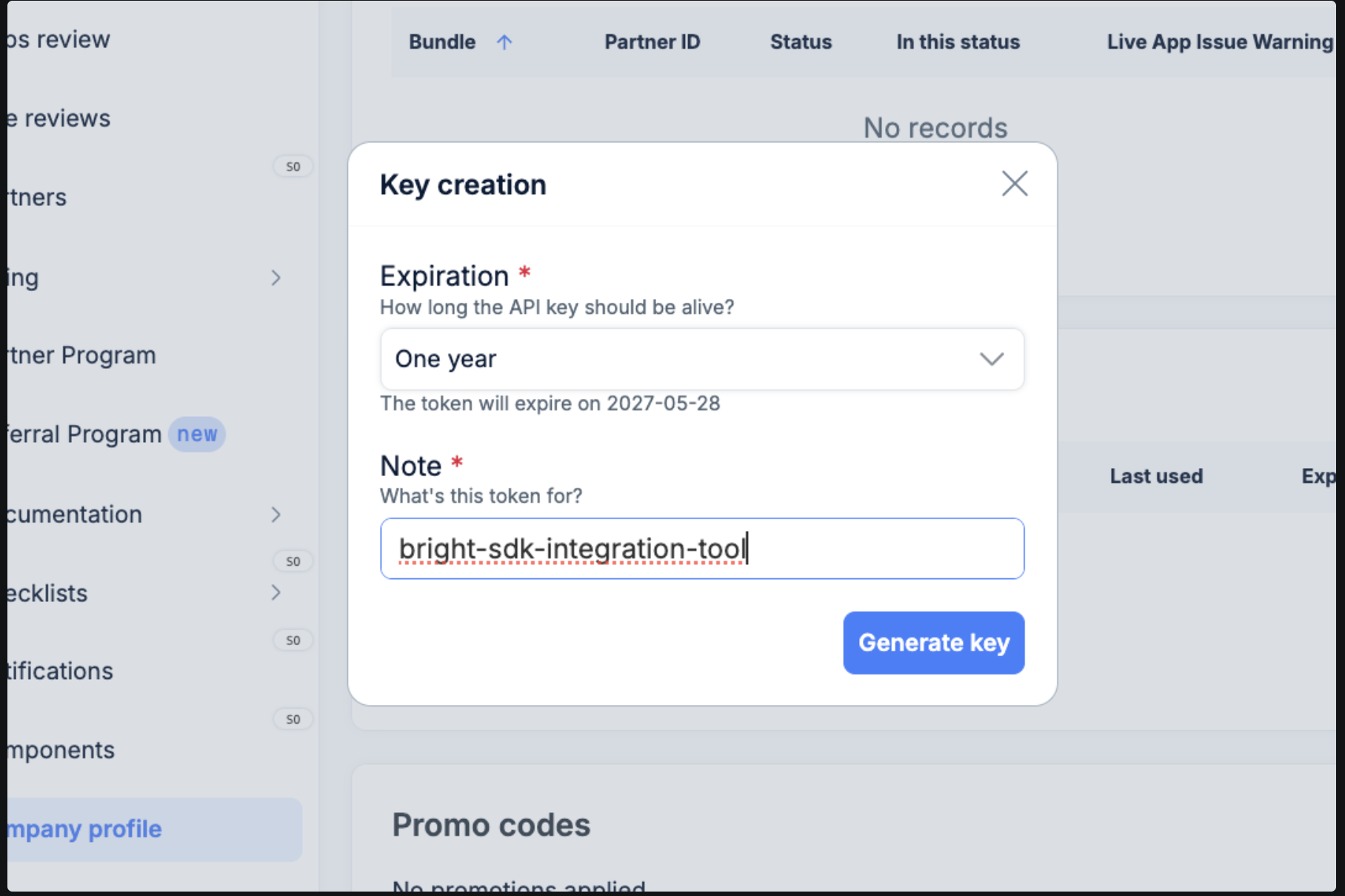
Click + Add. Choose an expiration (e.g. One year), give the key a descriptive name, then click Generate key.
Copy your key
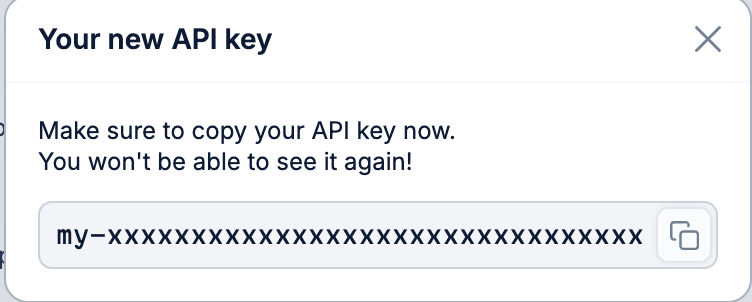
The generated key is shown once only - copy it immediately.
Important: Once you close this dialog the key cannot be retrieved. If lost, delete and create a new one.
Set the environment variablemacOS / Linux - export in your shell: