Use this file to discover all available pages before exploring further.
Are there any country restrictions for Bright SDK?
Yes. Bright SDK does not operate in the following countries:
Iran
Lebanon
Syria
North Korea
Cuba
Palestine
Sudan
Crimea
Russia
Belarus
Luhansk People’s Republic and Donetsk People’s Republic
Any installation of app with Bright SDK, regardless of whether the end user saw our offer screen or opted in to it, will not be counted, used or monetized in any way.
Is Bright SDK COPPA compliant?
Bright SDK is a tool that integrates with various applications, and as such is not the direct operator of the apps utilizing it. However, we take compliance with COPPA (Children’s Online Privacy Protection Rule) and other applicable privacy laws very seriously. While it is the responsibility of the app developers to ensure their apps comply with COPPA, we make our best efforts to support compliance by providing features and functionality that assist developers in meeting their obligations.Specifically, our SDK does not collect any type of personal information (except IP address) and does not display any content to the user. It is designed to include tools and settings that enable app developers to manage data collection in a manner that is consistent with COPPA guidelines. We also offer resources and guidance to app developers on how to configure the SDK in a way that respects users’ privacy, particularly with regard to children under 13 years of age.While we strive to ensure our SDK can be used in a compliant manner, the final responsibility for COPPA compliance lies with the app developers who integrate our SDK. We encourage all app developers using our technology to consult their legal advisors to ensure that their specific implementation meets COPPA requirements.
What does the user agree to?
We believe in full transparency. The user needs to understand what they are agreeing to. That is why the user is presented with a simple 1-screen offer, and not just a long text EULA that is hard to read or understand.
Do I have to display the opt-in screen? Can I modify it?
Yes, you must display the consent screen. Bright Data believes in total transparency, and that users should always decide if they want to opt-in. The Bright SDK will not work if your code does not display the consent screen.Please note that you can modify certain elements in the consent screen’s main texts, layout or graphics as detailed here. Moreover, you are able to specify specific items (e.g. the name of your app, text to display on the buttons etc). Check out the SDK documentation for specifics.
What value can I offer to my users in exchange to opting in?
Here are a few examples:
Seeing fewer ads (e.g. remove banners from a game session).
An alternative to seeing a reward ad (e.g. for getting a hint in a game) etc.
You may also simply ask for the user’s support of your app.
Yes! The user can opt-out anytime. You need to add a menu entry to where the user can disable BrightSDK.
Does Bright Data see my user's personal data?
No. We don’t want your user’s data. Bright Data uses only the Internet connection. We don’t see, collect or send any personal data, ever. Bright Data is compliant with the GDPR and CCPA.
Do websites see my user's personal data?
No! When data is downloaded from a website, it does not contain any information about the user. To the website it looks like a totally new, anonymous user that is not logged in coming from the user’s IP address.
Is Bright SDK GDPR/CCPA compliant?
Yes! Bright Data is fully committed to complying with all relevant data protection legal requirements, including the new EU data protection regulatory framework – the General Data Protection Regulation (“GDPR”) and the California Consumer Privacy Act of 2018 (“CCPA”).As an enthusiastic advocate of internet security and privacy, Bright Data understands the importance of providing data subjects with greater control on their privacy and data. Therefore, we have taken considerable efforts to ensure that our privacy practices comply with data protection laws, including the GDPR and CCPA, and the industry’s best practices regarding, among other things, respecting data subjects’ requests to exercise their rights.We are constantly examining applicable legal developments as well as the relevant provisions of the GDPR and CCPA in order to develop tools for our customers’ privacy-compliant use of our services.
Is the Bright SDK secure according to industry standards?
Yes. Bright SDK has been developed under the strictest security guidelines and is constantly monitored accordingly. Click for a detailed view of the SDK compliance with security industry standards by leading organizations.
Why does Kaspersky display a warning?
Kaspersky detects the general type of technology used by the Bright SDK to collect web data, which is called proxy.
But they also say very clearly that this it is NOT a virus. You can see specifically that Kaspersky, in their knowledge base, writes “If a user has installed such a program on his/her computer, or if it was installed by a system administrator, then it does not pose any threat.”
The Bright SDK R&D team works tirelessly to improve and optimize its performance. We strongly recommend integrating the latest version and keeping it regularly updated.We notify our partners about every new release through our monthly newsletter, and for critical updates, we send separate email notifications.At a minimum, every app should be updated with the latest SDK version once per quarter. Please note that updating the SDK does not require our compliance review and can be published directly through the relevant app store, as explained here.
What does Bright SDK do?
Bright SDK indexes information that is available on public websites. This information is freely available to any user, without a login or password, and is downloaded anonymously. Bright SDK is one of the tools that enables Bright Data to collect public web data.You can think of it this way: Bright Data automates the process that any human can do. For example, a company can put 100 employees to work 24/7 to record prices of product on a website, browsing individual URLs using a browser, reading the information they see on the screen, and manually fill large tables. Or they can just use Bright Data to do it automatically and at scale.For avoidance of doubt, here is a partial list of things that Bright SDK does NOT do. Bright SDK :
Does NOT use user’s credentials or information when downloading public web data from a website.
Does NOT collect any personal information regarding the user. Bright SDK complies with GDPR and CCPA.
Does NOT track the user in any way. Bright SDK does not have a notion of ‘user’. For example, if a user opts-in to the Bright SDK offer in an app, then uninstalls the app, reinstalls the same app and opts-in again, Bright SDK doesn’t know it was the same user.
Does NOT change content on websites (e.g. leave reviews, upvote). Web indexing is totally passive process.
Does NOT allow sending emails (port 25 is blocked) and can NOT be used to send spam. Bright SDK only uses port 80 and 443, to download traffic over HTTP and HTTPS.
Does NOT harm the website’s response time to users. Bright Data uses real-time monitoring to ensure web indexing does not impact the website and stops indexing if needed.
See this video for further illustration.
What is the Bright SDK opt-in screen? What does it say?
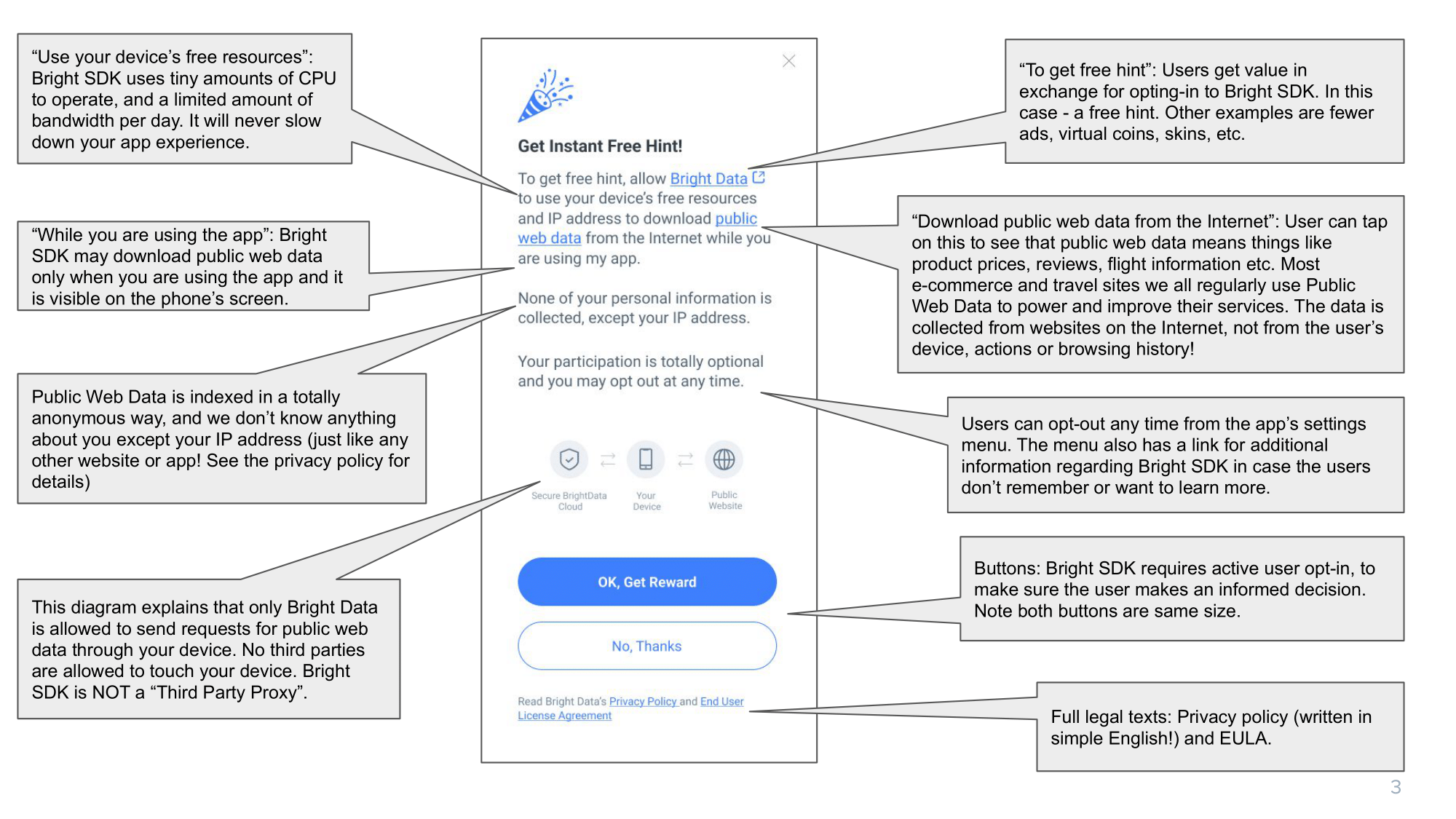
Bright Data believes in transparency and strong ethics.We think that users rarely read the fine print in a long text agreement, and that many users blindly click ‘accept’. And we don’t like that. We believe users should make informed decisions.For this reason, we decided to display a dedicated opt-in screen that will be simple and easy to understand. Of course, the full legal text is available for users who want to go deeper. Here is the consent screen, explained in detail – click the image to see the full size:
Can I decide when to show the consent screen?
Yes – you know your app best, so you can choose the best time to show it. Here are a few examples of possible times to display it:
If you are using the Bright SDK to replace ads:
On launch: ask the user ‘do you want to remove ads for free’?
After showing a few ads: ‘tired of ads? Remove them for free’
If you are using the Bright SDK for additional revenue on top of ads:
When you detect the user is happy and it is a good time to ask for their support
On launch ‘the app is free, help me keeping it free – if you accept the offer on the next page I will get paid’
Remember that you can offer the Bright SDK several times during the app’s lifetime and/or user’s journey inside a session.
Note that monetization will NOT start until the user has opted-in on the consent screen.
What are the guidelines to implementing the consent screen?
Take care when implementing the consent screen and the opt-out mechanisms, please make sure:
Users must ALWAYS decide if they want to VOLUNTARILY opt-in after seeing the consent screen.
ALWAYS have an easy way to opt out.
Bright Data recommends offering some value to the user in exchange for opting-in. <Read more here>
DO NOT suggest BrightSDK as an alternative to paying for subscription via the AppStore. This is in violation of AppStore’s policy.
Note: Bright Data reviews BrightSDK implementation after initial release and regularly thereafter.
Your account will be terminated if you violate the SDK implementation guidelines.
What if my users decide to decline the BrightSDK offer?
No problem! The user can decline when the BrightSDK screen appears, and then we suggest you offer them the ad-supported or premium version of your app. Keep in mind that the user may also opt-out at any point from the settings menu.
Does Bright SDK use cookies?
No.
Do Bright Data's customers see my user's personal data?
No! Bright Data customers send requests to Bright Data’s Secure Cloud. The request is then sent via your user’s device to the public website, and goes back to the customer via the Secure Cloud. The customer does not know where the response came from – not even your user’s IP address. They just know it came from country XYZ.
Is Bright SDK directed towards children under 13?
No, Bright SDK is not directed towards children under 13. Bright Data implemented several steps to limit Bright SDK to children under 13, including the following: Apps owned and operated by Bright Data are published on app stores with an age rating of 13+. This means that if a platform supports parental controls for app downloads and the parental controls were enabled in the device, Bright Data’s apps will not even be displayed in the relevant app store to children under 13. We advertise our owned and operated apps. Where possible, we ask our advertising partners not to show our ads to users under the age of 13. On platforms that have parental control, and Bright Data is able to identify that the user is defined in the age 0-12 years, the Bright SDK will not be available.To be clear, Bright SDK does not collect, use or disclose any personal information from its users and does not track user activity in any way. You can see further details and information in our privacy policy and FAQ.
Why does AVAST/AVG show a message about Bright SDK?
Certain versions of Avast and AVG may display a message saying that a Bright SDK partner app is “Potentially Unwanted Application (PUA)”. This is a general warning message to ensure that you, the user, chose to download these apps. Obviously you did, otherwise you wouldn’t be here!To be 100% clear, this does not mean in any way that Bright SDK is malicious or harmful to your computer!In fact, it is compliant with all of Avast’s guidelines and many other leading antivirus companies (click to learn more), which means that it meets their standards for quality, security, and performance.Therefore, we can assure you are in good hands! Visit our trust center to learn more.